
Mobile App Development Grounded in Real Device and Field Needs
Whether your team works on construction sites with intermittent reception or your customers manage accounts on the commute, mobile software requires careful attention to offline state, battery life, touch ergonomics and app store governance. We help you choose the right delivery approach and engineer dependable iOS and Android apps.
01 / Problem & Audience
When organisations need mobile app development.
Businesses frequently overspend maintaining two separate native codebases when a unified cross-platform architecture would suffice—or conversely, build a thin web wrapper when field staff actually need reliable offline data sync and native camera or location hardware.
Who This Service Is Designed For
- Field-service, logistics and inspection teams needing offline-capable mobile tools
- Consumer and B2B product teams launching companion or primary mobile experiences on iOS and Android
- Organisations consolidating legacy iOS and Android codebases into a maintainable architecture
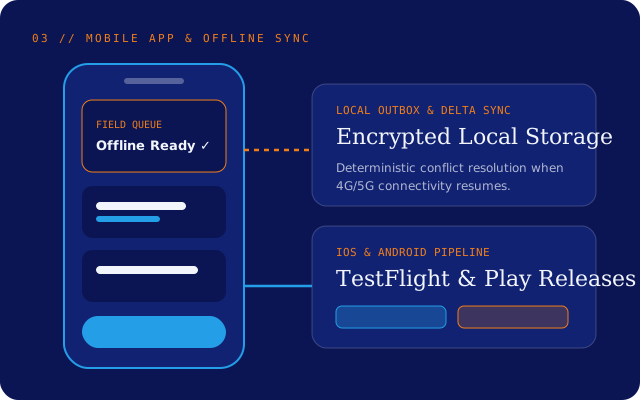
Reference Architecture Blueprint
Mobile Apps System Layers
02 / Scope & Process
How we scope and deliver mobile apps.
- Step 01
Platform & Offline Suitability Assessment
We evaluate whether your requirements call for cross-platform engineering (such as React Native), native modules, or a responsive web app before writing code.
- Step 02
Touch UX & Sync Architecture
We design thumb-friendly workflows and define local storage, conflict resolution and background synchronisation rules.
- Step 03
Iterative Device Builds & Testing
We distribute testable builds via TestFlight and Google Play Internal Testing so stakeholders can test on physical iOS and Android devices early.
- Step 04
Store Submission & Release Pipeline
We configure automated build signing, release notes, crash reporting and App Store / Google Play compliance checks.
03 / Practical Benefits
Concrete operational outcomes.
Pragmatic Platform Choice
Honest advice on cross-platform versus native engineering based on device APIs, performance and long-term maintenance budget.
Offline-Ready Workflows
Local queuing and deterministic sync patterns protect user data when mobile connectivity drops out.
Automated Store Delivery
Repeatable build and signing pipelines remove the risk of manual release steps tied to a single developer machine.
Version & API Compatibility
Backward-compatible API contracts ensure older app versions degrade gracefully while users update.
04 / Concrete Deliverables
What your team receives
- ✓Mobile application source code and native project configurations
- ✓Offline storage, sync queue and API integration modules
- ✓Automated CI/CD build and code-signing setup for iOS and Android
- ✓App Store Connect and Google Play Console submission guidance
- ✓Crash monitoring, release runbooks and version deprecation strategy
05 / Transparent Boundaries & Limitations
Honest scope conditions
Clear software engineering requires stating upfront what depends on external systems, client inputs or separate commercial tools:
- Apple App Store and Google Play review timelines and policy decisions are controlled by Apple and Google; we design apps to comply with current review guidelines and require client-owned developer accounts for publication.
- Hardware-specific integrations (such as proprietary industrial scanners) require physical test devices during development.
06 / Common Questions
Mobile Apps FAQs
Should we build a cross-platform app or separate iOS and Android apps?
For most business and B2B applications, a modern cross-platform framework like React Native allows you to share business logic and UI across iOS and Android while still accessing native device APIs. We recommend pure native modules only where heavy custom graphics or specialised OS integrations demand it.
Who owns the Apple and Google developer accounts?
Your company should always own the Apple Developer and Google Play Console accounts. We help you set them up and work via delegated team permissions so you retain full ownership of your store listings.
How do you handle users who do not update their apps immediately?
We version backend APIs and build a minimum-supported-version check into the app so critical security or breaking changes can prompt users clearly to update.
07 / Connected Capabilities & Reading
Related services & practical guide
Web Application Engineering
Develop responsive, accessible and maintainable browser-based products and portals.
API Design and Integration
Connect business systems reliably using documented contracts, idempotent workflows and clear observability.
UI/UX Product Design
Research real user workflows, test clickable prototypes early and design accessible, developer-ready interfaces.
Related Engineering Article · 7 min read
What to Test Before Launching a New Web Application
Passing happy-path feature demos on a developer laptop is only half the battle. A calm production launch requires structured verification across permissions, edge-case inputs, accessibility, performance and operational monitoring.
08 / Start a Conversation
Enquire about Mobile App Development.
Share a few details about your current system or planned project. Our engineering team will review your requirements and reply within two Australian business days.