
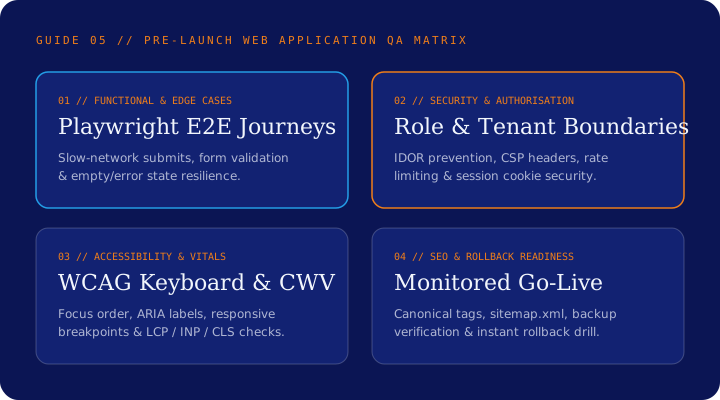
Executive Summary & Key Takeaways
What should engineering and product teams test before launching a new web application into production?
- Test negative paths and role authorisation boundaries just as thoroughly as happy-path user flows.
- Verify keyboard navigation, focus states, screen-reader labels and mobile touch targets across real viewports.
- Check technical SEO and browser metadata (canonical URLs, robots rules, 404 handling and Core Web Vitals) before removing staging protections.
- Never launch without verified database backups, error alerting and a tested rollback procedure.
1. Functional Workflows, Edge Cases and Form Resilience
During sprint demos, features are almost always tested with clean, expected inputs: short names, valid email addresses, fast broadband connections and single clicks. Real users behave very differently.
Before launch, test every critical journey (registration, sign-in, data creation, search, checkout or enquiry submission) with realistic edge cases: double-clicking submit buttons on a slow 3G connection, pasting long text strings or special characters, refreshing the browser mid-flow, and navigating back and forward with browser history buttons.
3. Accessibility, Responsive Viewports and Core Web Vitals
Unplug your mouse and complete your application’s primary workflows using only the Tab, Shift+Tab, Enter, Space and Escape keys. Can you always see where keyboard focus is? Do modal dialogs trap focus properly and return it when closed? Does every form input have an explicit programmatic label and clear error message?
Alongside accessibility, test layout behaviour at phone (320px–430px), tablet (768px–1024px) and desktop breakpoints, and profile Largest Contentful Paint (LCP), Interaction to Next Paint (INP) and Cumulative Layout Shift (CLS) on throttled mobile connections.
Pre-Launch QA Habit
Automated Playwright end-to-end tests wired into CI let you re-verify your top ten user journeys and accessibility checks on every release candidate in minutes.
4. Technical SEO, Monitoring Alerts and Rollback Readiness
For public-facing web applications, verify that staging noindex tags are removed on production, unique page titles and canonical tags render server-side, `sitemap.xml` and `robots.txt` are accurate, and unknown routes return a helpful HTTP 404 page.
Finally, confirm operational readiness: trigger a test error in production to prove your alerting channel works, verify automated database backups are running, and confirm your team can roll back to the previous deployment within minutes if needed.
Practical Verification Tool
Web Application Pre-Launch QA Checklist
- ✓Critical user journeys automated in Playwright/E2E tests and passing against the staging release candidate
- ✓Server-side role and tenant authorisation verified against unauthorized API requests
- ✓Forms tested for keyboard accessibility, explicit labels, validation messages, anti-spam and duplicate submission protection
- ✓Responsive layout and Core Web Vitals (LCP, INP, CLS) checked across mobile, tablet and desktop viewports
- ✓Titles, meta descriptions, canonical URLs, 404 page, sitemap.xml and robots.txt verified
- ✓Production error alerting, SSL certificates, database backups and one-click deployment rollback tested
Apply This to Your Project
Preparing to launch a web application or want an independent QA review?
Our engineering and QA team can audit your release readiness, set up automated Playwright regression suites and verify accessibility and security before launch.